


01
Incident priority
Severity ranked by sensor data, occupancy, asset value, SLA pressure and historical impact.
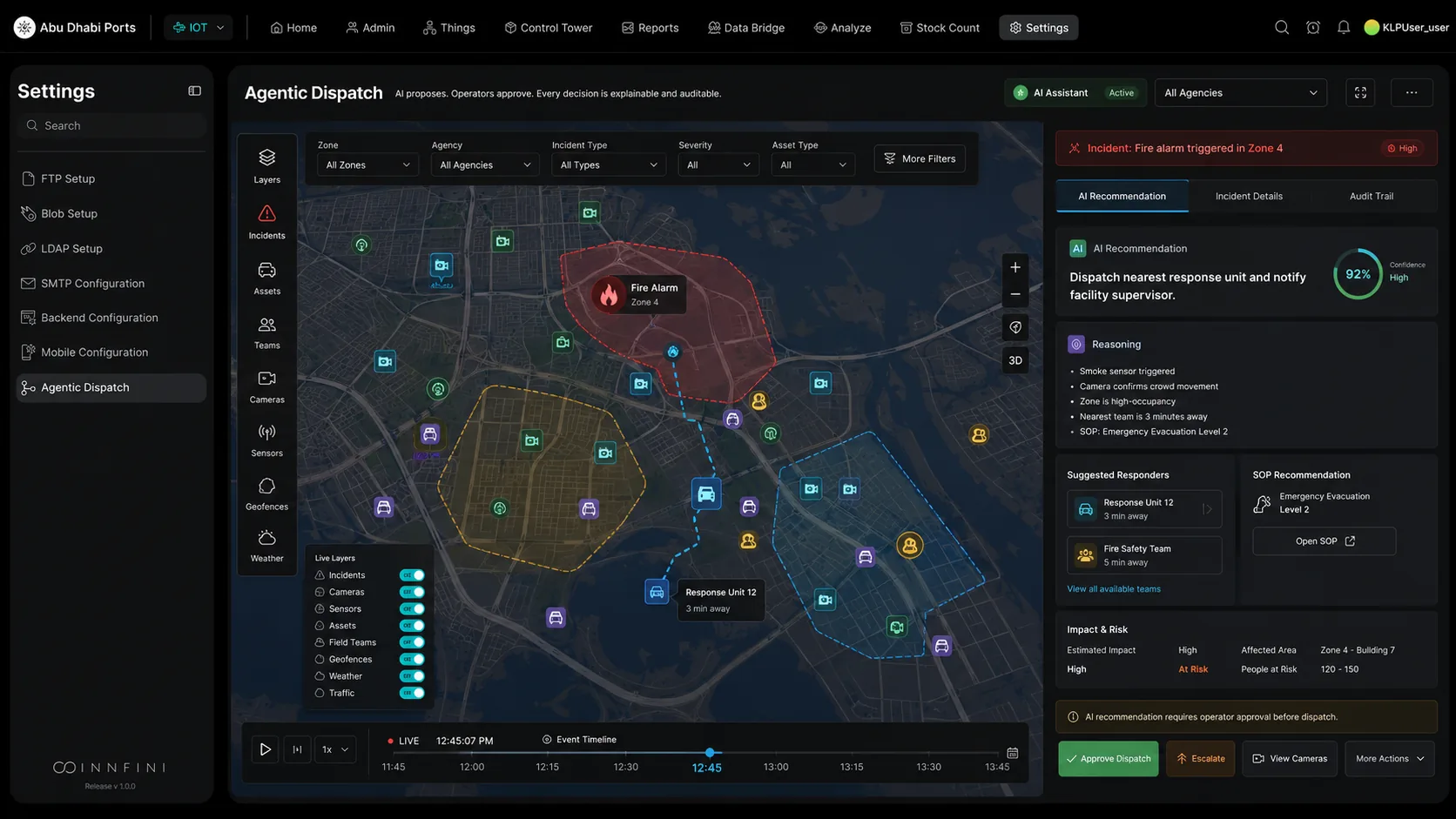
When an incident is detected, Innfini analyzes the situation, assesses impact, recommends the right SOP, identifies the nearest available responders and proposes the next-best action — all in seconds, with cited reasoning. The operator stays in control. Nothing dispatches without approval (unless a rule explicitly authorizes auto-action).
Each Innfini screen below is an illustrative scenario — a riverside city, a university mall, a port campus — showing the same agentic loop from the first signal to the closed record.
The operator opens INC-0007 — a high-severity fire alarm in Zone 4 of a riverside mall — and sees the live map on the left and the end-to-end recommendation on the right: dispatch Engine-12 via the proposed route to Gate 3. The evidence the recommendation rests on is listed and clickable, the available responders are ranked by ETA, and the status line says exactly where things stand: awaiting operator approval, no dispatch issued.
A recommendation is only as good as what it was allowed to see. For a fire alarm at the main entrance of Riverside Commons, Innfini assembles the full operational context before it proposes anything: the priority, who should be assigned, how it escalates, which SOP applies, what resources are nearby, who has to approve, what to communicate, the likely impact, the SLA at risk, and how similar incidents ended.
A crowd disturbance at University Mall shows the whole loop on one screen. Signals from three cameras are correlated into one incident; the agent proposes a Community Response unit with a 3-minute route and cites its evidence; the operator approves at the console; the approved dispatch rolls; and when the incident is resolved the outcome is reviewed, the citations are archived and the model is updated for next time.
Not every action deserves the same gate. Policies decide, per action type, how much autonomy the agent has: AUTO for pre-approved routine tasks such as sensor resets and status updates; ATTENDED for anything that needs an operator to approve, such as a maintenance dispatch or a variable message sign; SUPERVISED where an operator and a supervisor must both sign, such as lane closures or multi-agency coordination; and BLOCKED for actions that are human-only, such as emergency-services dispatch and system changes.
Once the operator approves, the record keeps going. Alarm detected at 18:36, plan proposed at 18:37, operator approved at 18:38, Engine-12 dispatched at 18:39 — with the sensor source, the approval and the crew dispatch each linked to their evidence. The response is in progress, the next step is field confirmation, and the after-action report is already most of the way written.
The agentic loop is the same wherever Innfini runs. On a port logistics campus a fire alarm in Building 7, Zone 4 is confirmed from the alarm and the detector, Response-12 is suggested from the fire-vehicle staging area with a 3-minute ETA and procedure EVAC-2, and the decision waits for the operator. Evidence reviewed, plan proposed, approval pending — on a port map instead of a city map.
Smoke, camera, RFID, sensor or operator report — every channel routes into the incident graph in real time.
Severity, SOP, responders, ETA, escalation path, similar past incidents — generated with citations and confidence.
The operator stays in control. Approve, escalate, modify or override — every decision recorded with identity + time.
Dispatch, alert, broadcast, lock-down, notify — through the integration layer. Outcomes streamed back to the canvas.
Outcome feeds the model. Next time the same pattern arrives, recommendation quality and confidence improve.
Every recommendation is a fusion of operational signals — not a black-box "best guess".
Severity ranked by sensor data, occupancy, asset value, SLA pressure and historical impact.
Nearest available crew with the right skill, equipment and certification — plus an ETA.
If unresolved in X minutes, escalate to Y — multi-level paths defined per SOP.
The right SOP attached, with required steps prefilled and trackable in-line.
Cameras, vehicles, suppression systems, first-aid stations and exits within the incident radius.
Threshold-gated approvals — by cost, severity, role or zone — surfaced inline.
PA, SMS, push, signage, mobile alert — scripted per SOP, ready to launch with one approve.
People affected, asset risk, downtime, financial exposure — quantified up front.
Probability of SLA breach with current resourcing — and what to change to recover.
Two or three precedents with their actions, outcomes and time-to-resolve — for fast pattern-match.
Innfini is AI-assisted, not AI-autonomous. Approval modes are configurable per SOP, per role, per severity — from full auto-execute on low-risk routine actions, to mandatory dual-control approval on high-stakes ones.
Pre-approved actions like camera cycling, log queries.
Operator must approve, but recommendation is presented inline.
Operator + supervisor approval required before action executes.
Some actions never automate — AI advises, humans always execute.
From detection to crew rolling — measured across deployed sites.
SOP attached automatically — no manual lookup, no missed steps.
Every dispatch is approved. Every approval is logged with identity + reason.
Every recommendation explains itself — sensor IDs, camera frames, past cases.
Agentic Dispatch is the AI-assisted, human-governed response loop at the heart of Innfini Command & Control. The platform proposes. The operator decides. The decision is explained. The outcome is learned.
A live walkthrough with our solutions team — your SOPs, your responders, your approval thresholds.